TL;DR
A real-time AI interview assistant listens to the live conversation, transcribes the question, retrieves from your own prepared material, and delivers a short cue — functioning as external working memory rather than a script generator. The problem it addresses is real: research found a negative relationship between interview anxiety and performance (corrected correlation ≈ -0.19), 92% of U.S. adults report interview anxiety, 65% of jobseekers say nerves stopped them showing their true ability, and 30% lose their train of thought. Latency decides whether the tool helps or hurts — near-sub-second cues can shape your next sentence, while several-second delays produce stale guidance and visible eye drift. Prioritize transcription quality and resume-grounded retrieval over decorative interface features, since poor recognition feeds bad input into everything downstream. Before trusting any tool with a live call, verify retention, processing location, third-party API use, encryption, and deletion controls, and check the employer's stated policy. The ethical line is simple: the assistant should help you express experience you genuinely have, not manufacture experience you don't.
You're halfway through an interview when the hiring manager asks, “Tell me about a time you changed direction after seeing new data.” You know the story. You led the project, remember the decision, and could explain it easily to a colleague. But under the camera, with the interviewer waiting, the sequence disappears. You recall the meeting, then lose the result, then start speaking in broad phrases that don't sound like you.
A real-time AI interview assistant is built for that gap between knowing your experience and accessing it under pressure. It shouldn't write a personality-free answer for you. Used responsibly, it acts more like external working memory, offering a short cue, a forgotten metric, or a reminder to explain your own action before the conversation moves on.
What Is a Real-Time AI Interview Assistant?
A real-time AI interview assistant is a tool that follows the live audio of an interview, interprets the question being asked, searches your prepared material, and displays a short private cue while the conversation continues. Think of it as a teleprompter that listens and thinks with you — not one scrolling a finished speech.
It's built for a specific gap: the distance between knowing your experience and accessing it under pressure. That gap is a cognitive load problem, not a knowledge problem. You're trying to retrieve a specific memory while simultaneously listening, watching yourself on camera, and evaluating whether your answer is landing.
The loop has four parts:
- Audio capture — takes in the meeting stream or microphone input, distinguishing the interviewer's question from filler and pauses.
- Automatic speech recognition — converts spoken language to text, so the system works with the actual question rather than a prewritten list of likely prompts.
- Context retrieval — searches the material you supplied (resume, role description, prep notes, story bank) so a conflict question surfaces your project rather than a generic example.
- Cue delivery — sends a compact prompt to a private surface you can glance at while the interviewer sees a normal call.
How it differs from what else exists. A scripted AI prep tool generates answers from a typed prompt but doesn't know what the interviewer just asked. A human coach provides interpretation and accountability but isn't inside the live conversation. A resume-grounded live assistant sits in the middle — reducing the need to switch between the call, a document, and your memory at the exact moment you're being evaluated.
The boundary that matters: a cue like "customer impact, dashboard adoption, your decision" helps you recover your own context. A generated paragraph you couldn't defend independently is a different thing entirely. Never rely on a prompt for an answer you couldn't give cold.
The Moment Your Mind Goes Blank
The interviewer repeats the question, gently this time. You say, “Sure,” while trying to reconstruct the beginning of the story. The pause feels longer than it is. Your attention splits between listening, remembering, watching your own face on screen, and deciding whether the answer you're forming sounds coherent.
That reaction isn't a sign that you lack ability. Interview anxiety can interfere with performance, particularly when communication and social pressure are involved. A peer-reviewed study found a negative relationship between interview anxiety and interview performance, with a corrected population correlation of about -0.19. Its analysis identified communication anxiety and social anxiety as especially relevant components, with correlations of -0.15 and -0.16, respectively. You can review the study on interview anxiety and performance for the full context.
The practical problem is often cognitive load. You're not searching for knowledge from nowhere. You're trying to retrieve a specific memory while managing a live social exchange. That's why a small reminder such as “customer impact, dashboard adoption, your decision” can be more useful than a polished paragraph.
Practical rule: Use assistance to recover your own context, not to replace your own judgment.
The need is widespread. Anxiety.org cited a survey in which 92% of U.S. adults felt anxious about job interviews, while respondents named concerns such as general nervousness, not knowing answers, and being late. The figures appear in Anxiety.org's overview of job interview anxiety. A separate totaljobs report found that 65% of jobseekers felt nerves stopped them from showing their true ability, while 30% said they lost their train of thought during interviews, as reported by Onrec's coverage of the findings.
That's the human moment this category addresses. The assistant doesn't make the interview effortless. It gives your prepared experience a better chance of appearing when the pressure makes recall unreliable.
What a Real-Time AI Interview Assistant Actually Is
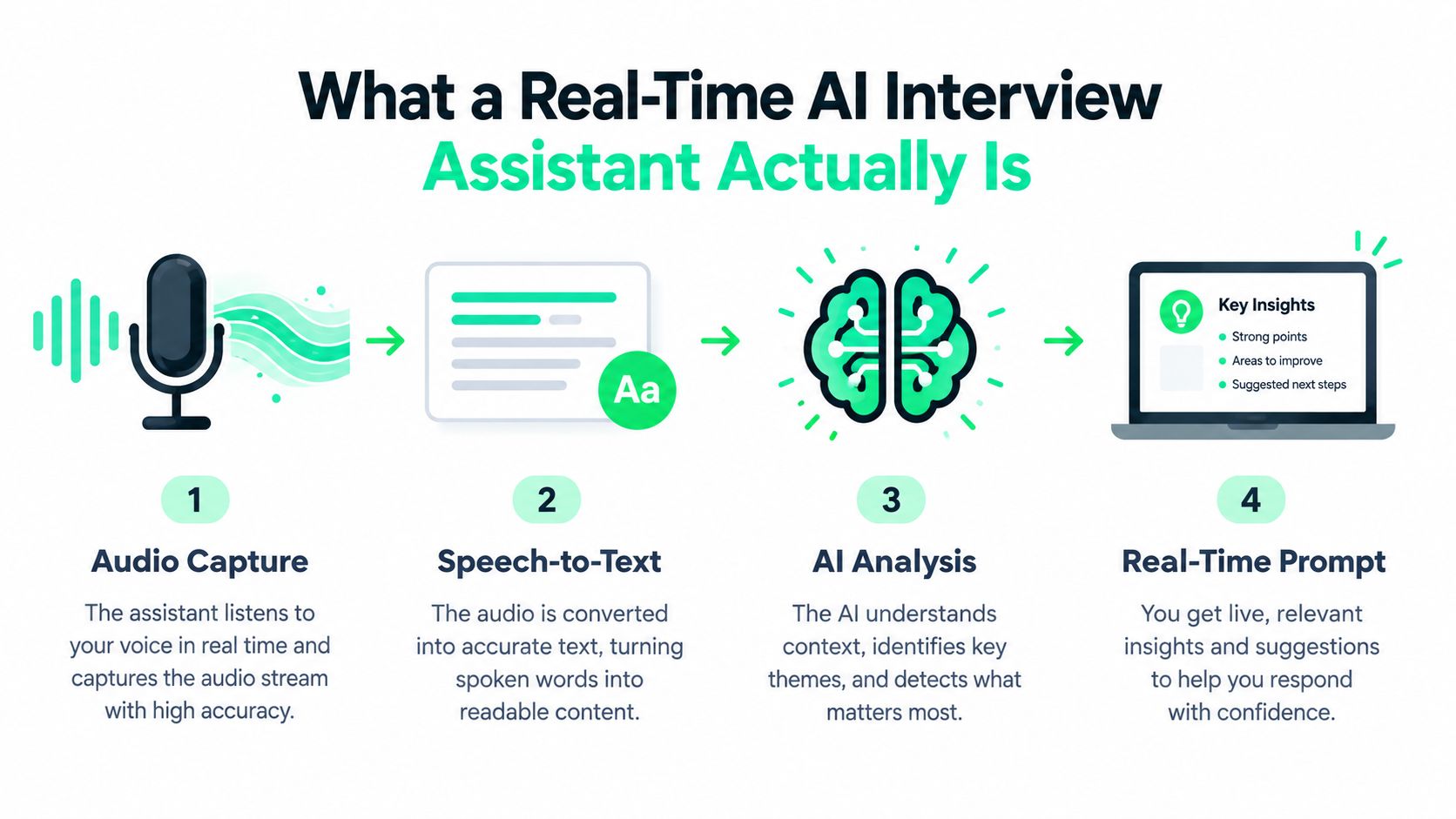
Think of the tool as a teleprompter that listens and thinks with you, not one that scrolls a finished speech. A normal chatbot waits for you to type a prompt. A real-time assistant follows the audio of the conversation, interprets the question, checks your prepared context, and displays a compact cue while the interview continues.
The loop usually has four parts.
- Audio capture takes in the meeting stream or microphone input. The assistant needs to distinguish the interviewer's question from surrounding speech, pauses, and conversational filler.
- Automatic speech recognition turns spoken language into text. This lets the system work with the actual question rather than relying on a prewritten list of likely prompts.
- Context retrieval searches the material you've supplied, such as your resume, role description, preparation notes, or story bank. If the interviewer asks about conflict, the system can look for your relevant project rather than inventing a generic workplace example.
- Cue delivery sends a short prompt to a private surface. Depending on the tool, that may be a local window, browser panel, or overlay that you can see while the interviewer sees the normal call.
The point of the design is timing. A cue such as “state the constraint, then explain your trade-off” supports your thinking without forcing you to read a script word for word. The assistant can also help you notice a follow-up question that relates to something you said earlier.
A tool that only generates answers from a typed prompt is a scripted AI helper, not a live assistant. Tools such as Qcard fit the live, audio-driven category because their purpose is to help candidates access relevant preparation during an active conversation. That distinction matters, especially when your real problem is not “What should anyone say?” but “Which part of my own experience answers this question?”
The Core Features That Matter in a Live Interview
A useful assistant performs jobs, rather than merely displaying impressive settings. The first job is to capture the interviewer's question accurately. If “How did you measure the launch?” becomes “How did you manage the lunch?”, every later step can be wrong.
The second job is to identify important terms. Company names, role titles, product areas, tools, customers, and metrics can signal what context matters. For example, if you mention reducing audit exceptions and the interviewer asks how you measured success, a good cue might remind you to return to the specific quality measure you prepared.
The third job is memory retrieval. Suppose you worked on a reporting project in 2022 and forgot it while discussing stakeholder disagreement. A resume-grounded cue could surface the project name and suggest a structure such as situation, responsibility, action, and result. You still need to explain what happened and defend the decisions.
The fourth job is delivery awareness. A coach can flag that your answer is becoming long, that you're using repeated filler words, or that you haven't stated your personal contribution. Totaljobs research reported that 26% of jobseekers said they talked too quickly and 20% said they talked too much, which gives these controls a practical purpose. The totaljobs findings reported by Onrec provide the cited figures.
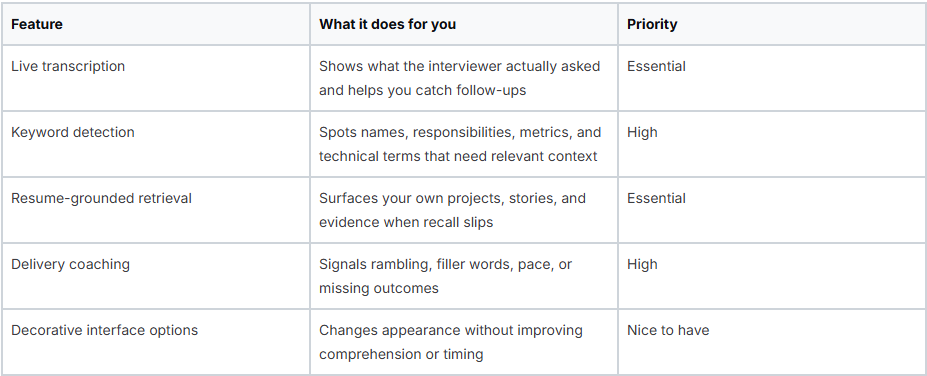
Transcription quality is the make-or-break capability. If recognition is unreliable, retrieval receives poor input and the prompt becomes a distraction. Candidates comparing preparation options can also use Qcard's mock interview AI to practise answering aloud, because an assistant works better when your underlying stories are already familiar.
A practical test is simple. Ask a friend to conduct a short mock interview with interruptions and follow-ups. Check whether the tool identifies the current question, retrieves the right story, and keeps the cue short enough to scan without abandoning eye contact.
Why Latency Is the Difference Between Useful and Useless
A live assistant doesn't need to produce a perfect essay. It needs to produce a relevant cue while you can still use it. Research on interactive voice agents reported 0.94 seconds of end-to-end per-utterance latency, with automatic speech recognition around 0.05 seconds and text-to-speech around 0.28 seconds. The research on interactive voice-agent latency indicates that the language-model step can become the dominant bottleneck.
Word-level timing matters more than waiting until the entire conversation has ended. Research and practical guidance describe transcript segments arriving roughly 1 to 3 seconds after an utterance is finalized, while additional buffering can raise utterance-level latency to about 1.4 seconds and word-level latency to 1 to 6 seconds. These figures are discussed in guidance on real-time transcription APIs.
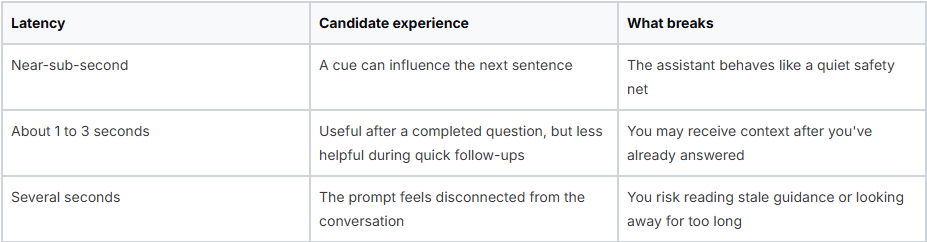
Artificial buffering can make a system feel smoother to its engineers while making it less useful to a candidate. If the interviewer asks a follow-up before the previous transcription is complete, the assistant may still be processing the old question. You then see a correct answer to the wrong moment.
Latency also creates a social cost. A delayed cue encourages eye drift, rushed pauses, and frantic screen checking. In a video interview, those behaviors can make you appear less engaged even when your content is strong.
This is why adjacent systems, such as browser-based call translation with AI, offer a useful comparison. Translation and interview support both depend on fast speech capture, continuous processing, and output that arrives before the next conversational turn. A feature that works in a product demonstration may still fail when network jitter, accents, overlapping speech, or rapid probing enter the call.
How It Compares to Human Coaching and Other Tools
Human coaching is strongest when you need interpretation. A skilled coach can notice that your example avoids ownership, ask why you chose a particular trade-off, and help you understand how your answer affects another person. The limitation is timing. Coaching requires a scheduled session and can offer deep feedback before or after the interview, but it isn't sitting inside the live conversation.
Scripted AI preparation tools solve a different problem. You enter a role, company, or sample question, and the system generates possible answers or practice prompts. That's useful for building fluency, but it doesn't know what the interviewer has just asked unless you provide that information. A rehearsed response can also make you sound less natural when the question changes shape.
Resume-grounded live assistants occupy the middle. They can listen to the actual question, transcribe it, and retrieve concise reminders from material you've prepared. The advantage isn't that they know more than you. It's that they reduce the need to switch between the call, a document, and your memory at the exact moment you're being evaluated.
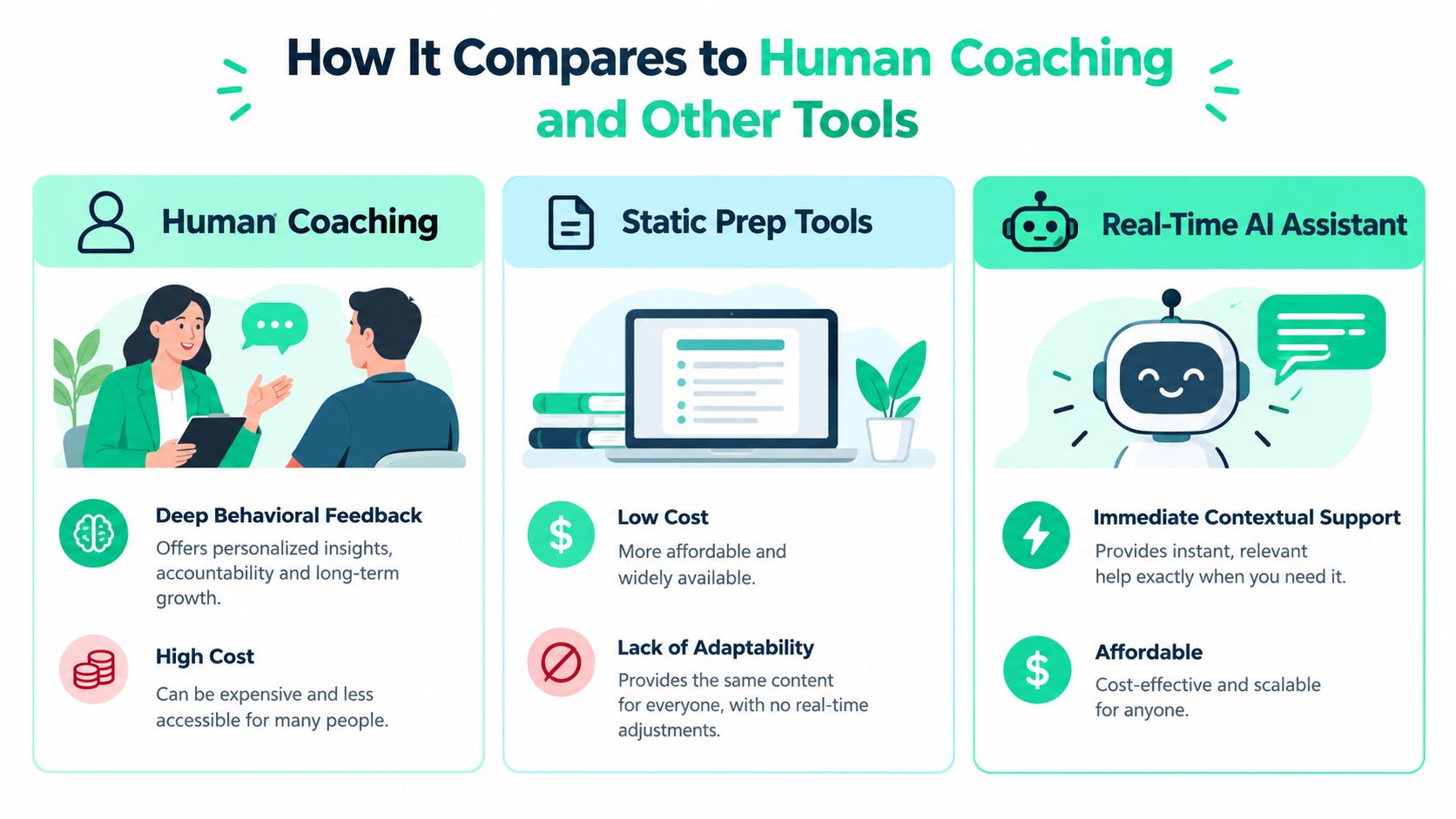
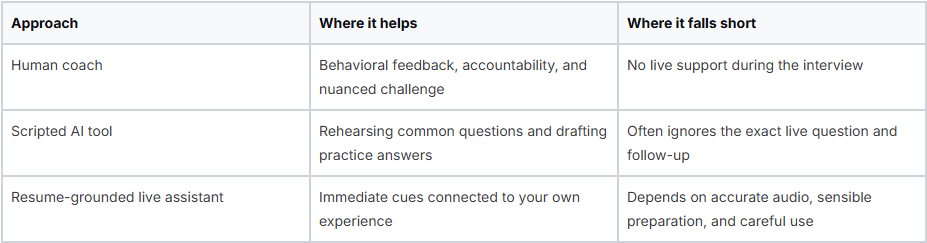
The distinction between recall and outsourcing is important. If a tool reminds you that you led a migration and asks you to explain the result, you still own the answer. If it supplies claims you've never made or a story you can't defend, it creates risk.
Candidates who want structured rehearsal can explore Qcard's AI interview coach alongside human feedback or static preparation. The right combination depends on your difficulty. Someone who lacks examples needs preparation first. Someone with strong experience but unreliable recall may benefit more from compact, timely cues.
Privacy, Authenticity, and the Fairness Question
“Is using a live assistant cheating?” doesn't have one universal answer. Employer policies, interview instructions, assessment rules, and the tool's behavior all matter. Using a private cue to remember your own verified project can resemble an accessibility or preparation aid. Reading generated answers that you couldn't explain independently crosses into a different kind of conduct, and using any external assistance in a closed-book or proctored assessment may violate the rules.
The fairness question is becoming harder because employers also use automated systems in recruitment. Greenhouse's 2026 Candidate AI Interview Report surveyed 2,950 active job seekers across the U.S., UK, Ireland, Germany, and Australia, finding that 63% had already been interviewed by AI, an increase of 13 percentage points in six months. The figures were reported in CNBC's coverage of AI interview technology. The same reporting cycle found that nearly 4 in 10 U.S. job seekers had withdrawn from a hiring process over an AI interview.
That context doesn't automatically justify candidate-side assistance. It does show why authenticity, access, and transparency deserve more attention than a simple cheating label.
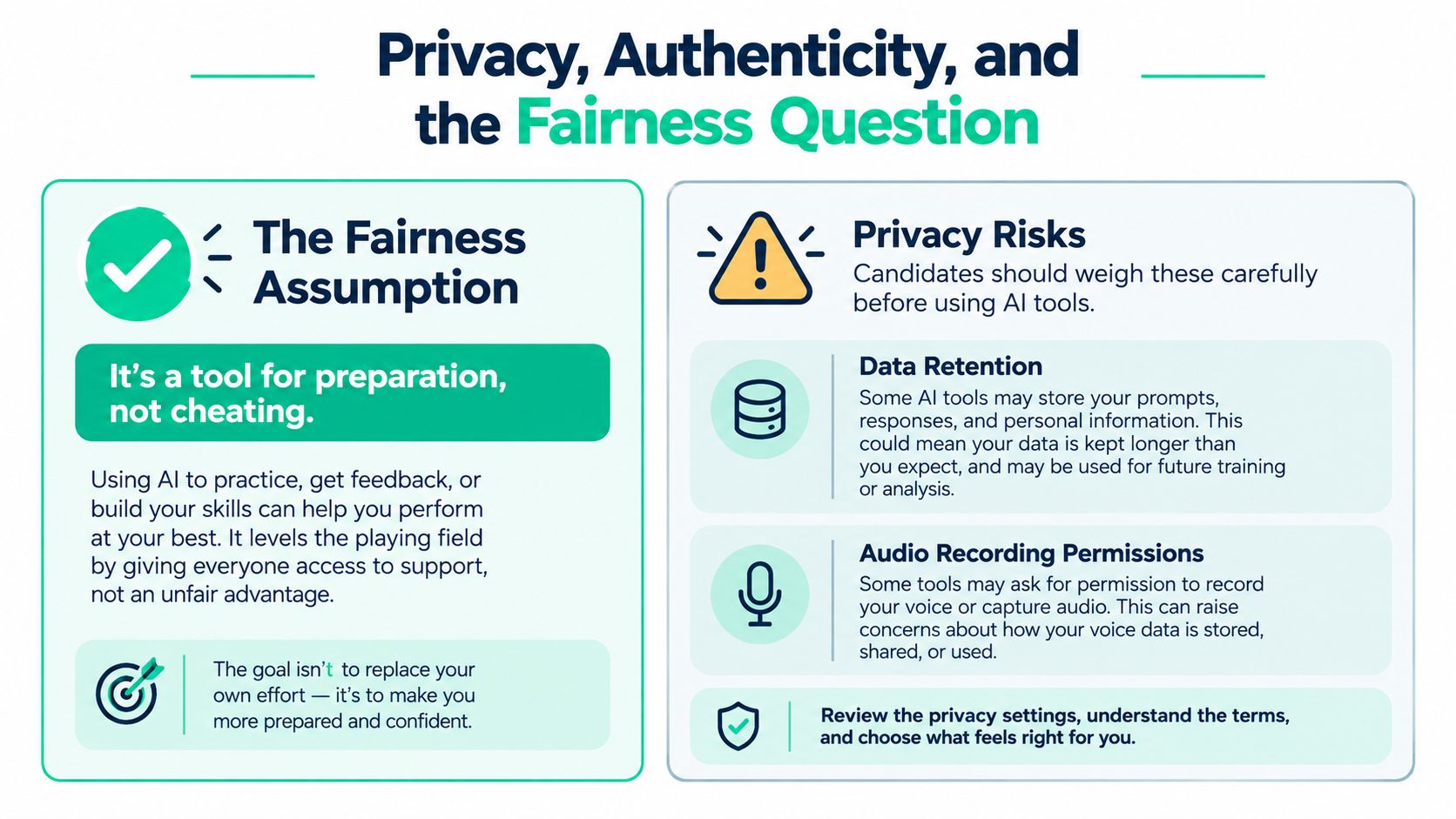
Before trusting a tool with a live conversation, ask:
- Retention: Does the vendor keep audio, transcripts, prompts, or recordings after the session?
- Processing: Is speech processed on your device, on a remote server, or through both?
- Third parties: Are interview questions or transcript segments sent to external language-model APIs?
- Security: Is the session encrypted in transit and at rest?
- Control: Can you delete stored data, disable recording, or end processing immediately?
Ethical boundary: The assistant should help you express experience you genuinely have. It shouldn't manufacture experience you don't.
Fairness also includes candidates who are anxious, multilingual, or neurodivergent. A cue that lowers cognitive load can help someone stay engaged with the interviewer, but excessive prompting can create dependency or increase distraction. The most defensible use is narrow and transparent in spirit, grounded in your preparation, and compatible with the employer's stated rules.
Real Scenarios Where a Live Assistant Changes the Outcome
A mid-career analyst is moving from auditing into product analytics. During a question about influencing stakeholders, she remembers the disagreement but loses the evidence. A small cue surfaces the project, the KPI she monitored, and the result she had included in her preparation notes. She explains the decision with concrete ownership instead of filling the silence with general statements about collaboration.
A multilingual software engineer faces a different problem. He understands the technical question in his second language but begins translating an idiom word for word, which makes the explanation harder to follow. The live transcript helps him see the sentence forming, while a brief reminder prompts him to replace the idiom with a direct description of the trade-off. The tool doesn't supply technical knowledge. It helps him notice when language is obscuring knowledge he already has.
A senior engineer with a neurodivergent working style may have strong examples but struggle to hold several conversational threads in working memory. During a discussion about incident response, the assistant keeps a quiet cue about the incident, the engineer's role, and the follow-up result. That externalized context lets the candidate listen to the next question instead of mentally protecting the previous answer.
These scenarios share a constraint: the tool is valuable only when the candidate has real material to retrieve. An assistant can remind you about a project, but it can't make an unfamiliar system design decision yours. It can suggest that you quantify an outcome, but you must know what the outcome was.
Structured interviews reward that kind of preparation. A 2022 review in PubMed Central stated that structured interviews decrease bias in the application process and that behavior-based training with scoring rubrics reduced racial biases in candidate evaluations. The review of structured interviews and bias supports practising clear, evidence-based responses rather than memorizing elegant scripts.
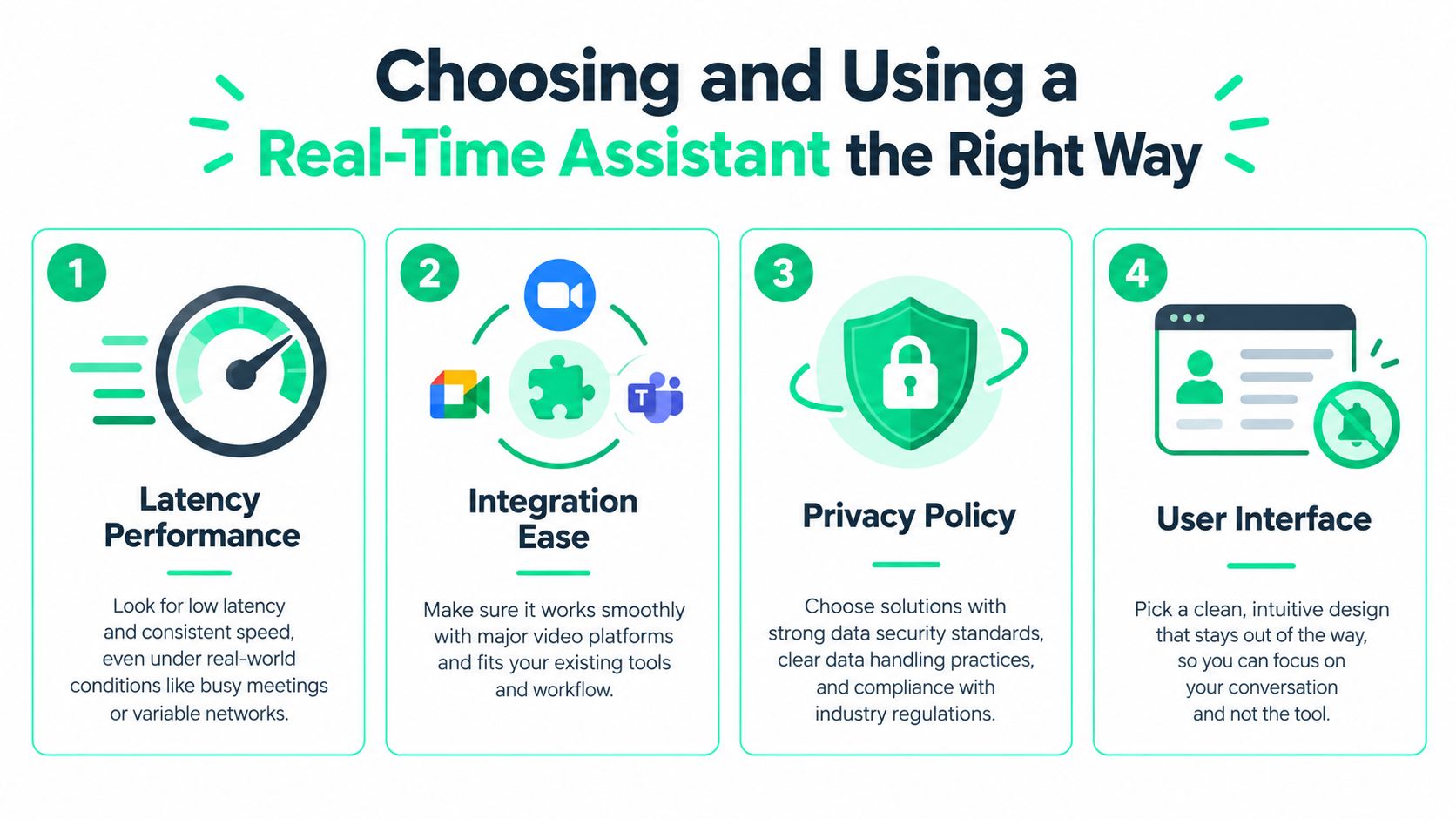
Choosing and Using a Real-Time Assistant the Right Way
Start with the question the vendor may prefer you not to ask: “What happens when the connection is unstable?” Test the assistant on a real call, with background noise, interruptions, and follow-up questions. A smooth demo doesn't prove that the system will keep pace when an interviewer changes direction.
Use four checks before an important interview:
- Latency under pressure: Ask whether the system processes partial speech continuously or waits for a completed utterance. Run a rehearsal and observe whether prompts refer to the current question.
- Data handling: Ask where audio and transcripts are processed, how long they're retained, whether recording is optional, and which outside services receive the data. If the answers are vague, treat that as a product limitation.
- Grounding: Confirm that prompts can be restricted to your resume and preparation notes. Then test an obscure project detail. A trustworthy system should help retrieve your material, not confidently invent a substitute.
- Rules and interface: Check the employer's policy and assessment instructions before using external assistance. The interface should remain glanceable, discreet, and easy to close. If you need to keep switching windows, it may cost more attention than it saves.
Practise before you go live. Record yourself answering common behavioral questions, review where you ramble, and learn how to interpret a cue without reading it aloud. If you need a broader workflow for how to transcribe interviews, use that process during preparation to review your own answers, not to outsource your thinking during the call.
Keep the final rule simple: never rely on a prompt for an answer you couldn't give cold. Build the stories, understand the technical fundamentals, and use the assistant only to recover structure, context, or delivery control. The Qcard interview prep guide can help organize that preparation before you decide whether live support belongs in your process.
Key Takeaways
- The category solves a retrieval problem, not a knowledge problem — candidates who know their story still lose the sequence under camera pressure, which is why a compact cue naming the project, the metric, and the decision is more useful than a polished paragraph you'd have to read aloud.
- Latency is the single feature that separates useful from useless — research on interactive voice agents reported about 0.94 seconds end-to-end per-utterance latency, while transcript segments commonly arrive 1 to 3 seconds after an utterance finalizes, and anything beyond that means you receive a correct answer to the wrong moment plus the social cost of visible screen-checking.
- Transcription quality is the make-or-break capability, because everything downstream depends on it — if "How did you measure the launch?" becomes "How did you manage the lunch?", retrieval receives bad input and the cue becomes a distraction rather than a safety net.
- Privacy questions should be answered before a live call, not after — ask whether audio, transcripts, and prompts are retained, whether speech is processed locally or remotely, whether transcript segments go to external language-model APIs, whether sessions are encrypted in transit and at rest, and whether you can delete data or stop processing immediately; vague answers are a product limitation.
- The fairness conversation is more complicated than a cheating label, since employers are using AI too — Greenhouse's 2026 report of 2,950 job seekers found 63% had already been interviewed by AI, up 13 percentage points in six months, while nearly 4 in 10 U.S. job seekers withdrew from a process over an AI interview, which makes authenticity, access, and employer policy the more useful frame than a blanket rule.
Qcard offers resume-grounded real-time cues, voice transcription, and Interview Coach feedback for pacing, filler words, and answer length, with modes suited to different call setups. If you want cognitive support that keeps your own experience at the center, visit Qcard and practise with your stories before your next interview.
Ready to ace your next interview?
Qcard's AI interview copilot helps you prepare with personalized practice and real-time support.
Try Qcard Free