TL;DR
Live coding interview practice is monitored-performance training, not algorithm review — which is why strong solo problem-solving often collapses under observation. NC State and Microsoft research found that being watched in a traditional live coding setting reduced performance by more than half. Build practice around four shifts: gradually add observation, narrate decisions in compact units, budget time in announced milestones, and rehearse recovery language for when the first approach fails. Structure it as a 60-minute block (10-minute narrated warm-up, 15 minutes of IDE fluency, 25-minute decomposition drill with 8 minutes of forced skeleton first, 10 minutes of reflection), rotate three drills (timed narration, silent partner debugging, 5-minute replay review), and track time to first spoken sentence, time to first working test, and dead-end attempts. Score mocks on five dimensions — correctness, edge cases, communication, code quality, and recovery — using a 0-to-4 scale. Treat your environment like production infrastructure: 18-to-22 point font, external webcam above the monitor, boom mic, hardwired connection, Copilot and linters disabled during mocks.
You're two minutes into a live coding call. You understand the prompt, but the IDE is blank, the interviewer is watching your cursor, and the approach that felt obvious alone has disappeared. You type a few lines, delete them, apologize, and lose more time trying to recover than you would have needed to solve the problem.
That failure isn't always an algorithms failure. Live coding interview practice is monitored-performance training. You're practicing how to think while observed, explain decisions before they're fully formed, manage a fixed session, and recover visibly when the first approach breaks. A strong LeetCode streak can improve your knowledge while leaving those skills untouched.
Interview anxiety makes this gap common. A survey of employed U.S. adults reported that 92% were anxious about job interviews, while UK research found that nerves prevented 65% of jobseekers from showing their true ability. The same research reported that 30% lost their train of thought during interviews. JDP's interview preparation survey connects rehearsal with the practical problem you're trying to solve: reducing cognitive overload when someone is evaluating your work.
What Is Live Coding Interview Practice and How Do You Do It Right?
Live coding interview practice is monitored-performance training — you're rehearsing how to think while observed, explain decisions before they're fully formed, manage a fixed session, and recover visibly when the first approach breaks. A strong LeetCode streak can improve your knowledge while leaving all of those skills untouched.
The observation effect is real and measurable. A randomized controlled trial from North Carolina State University and Microsoft found that being watched in a traditional live coding setting reduced performance by more than half, with significantly higher stress and cognitive load than in a private setting. Meanwhile, a survey of employed U.S. adults reported 92% were anxious about job interviews, and UK research found nerves prevented 65% of jobseekers from showing their true ability, with 30% losing their train of thought.
Effective practice requires four shifts:
1. Treat observation as a trainable condition. Add it gradually — record yourself solving a familiar problem, then solve a fresh problem while a friend watches without helping. The goal isn't immediate comfort; it's teaching your attention that a visible cursor, a camera, and another person's silence are normal inputs.
2. Make your thinking audible. Interviewers can't score an approach they can't hear, and silence often looks like confusion even when you're making progress. Narrate in compact units: "I'm choosing a hash map because I need constant-time lookup." Explain choices that affect correctness, complexity, or maintainability — not every keystroke.
3. Budget your time in milestones. A live problem isn't one uninterrupted sprint. It has stages for understanding, clarification, design, implementation, testing, and review. Announce those milestones so you don't spend the session polishing an approach that was never validated.
4. Rehearse recovery explicitly. Choose a problem where your first idea is likely to fail, then practice saying: "This path is creating too much state. I'm going to step back, preserve the invariant we do have, and try a simpler representation."
Then build a repeatable 60-minute block: 10 minutes of warm-up (easy array or string problem, solved aloud), 15 minutes of typing and IDE fluency, 25 minutes of decomposition drilling on a medium problem (with 8 minutes writing a forced skeleton before coding), and 10 minutes of reflection while the sequence is fresh.
What Live Coding Interview Practice Really Means
The first mental shift is to treat observation as a trainable condition, not a threat. A randomized controlled trial from North Carolina State University and Microsoft found that being watched in a traditional live coding setting reduced performance by more than half, while stress and cognitive load were significantly higher than in a private setting. The university's report on technical interview anxiety makes the practical implication clear: solving privately isn't enough if the assessment happens publicly.
Start by adding observation gradually. Record yourself solving a familiar problem, then solve a fresh problem while a friend watches without helping. The drill isn't designed to make you comfortable immediately. It teaches your attention that a visible cursor, a camera, and another person's silence are normal inputs.
Make your thinking audible
The second shift is moving from internal reasoning to structured narration. Interviewers can't score an approach they can't hear, and silence often looks like confusion even when you're making useful progress. Narrate in compact units: “I'm checking whether the input can be empty,” “I'm choosing a hash map because I need constant-time lookup,” or “This works for the example, but I need to test duplicates.”
The third shift is time budgeting. A live problem isn't one uninterrupted sprint. It has milestones for understanding, clarification, design, implementation, testing, and review. Practice announcing those milestones so you don't spend the entire session polishing an approach that hasn't been validated.
Finally, rehearse recovery. Deliberately choose a problem where your first idea is likely to fail, then practice saying, “This path is creating too much state. I'm going to step back, preserve the invariant we do have, and try a simpler representation.” The goal isn't to avoid mistakes. It's to make your response to mistakes observable and useful.
Practical rule: Track how you perform under observation, not only whether your final code passes.
The 2016 HackerRank analysis offers an important foundation for structured repetition. Developers with at least two years of experience who completed 20 coding challenges were reported to increase their chances of getting an onsite interview by 50%, while junior developers who solved 20 challenges increased their chances by at least 15%. HackerRank's analysis of interview practice supports practice as a measurable lever, but the modern version of that practice must include communication and observation.
Setting Up Your Practice Environment
Treat your practice environment like production infrastructure. If the camera is badly positioned, the audio echoes, or your screen share stutters, you're spending mental capacity on the setup instead of the interview skill.
Use a dual-monitor or ultrawide arrangement with the primary display at eye level. Put the external webcam above the monitor rather than beside it, and use a headset with a boom microphone to reduce keyboard noise. Prefer a hardwired connection. If you rely on Wi-Fi, measure its stability before a mock and keep a mobile hotspot available as a fallback.
Your background should be quiet and neutral, with enough front lighting for the interviewer to see your face. Run the actual meeting platform before the session, not a substitute. Remote interview guidance recommends testing permissions, screen-sharing behavior, IDE font size, and which window or screen the interviewer will see. These remote developer interview setup tips are especially relevant when the platform behaves differently across operating systems.
Make the IDE readable and inspectable
Use an 18 to 22 point font, a high-contrast theme, and a clean project with predictable build and test commands. Disable Vim extensions and Copilot during mocks. Turn off the linter and formatter so the observer can see your keystrokes and reasoning rather than a tool automatically rewriting the buffer.
Test the share at 1080p, then monitor it from a secondary device. The second device catches unreadable text, delayed updates, and accidental sharing of the wrong window before your practice session becomes a troubleshooting session.
- Audio echo: Leave the call on one device, mute every other microphone and speaker, and make a short recording before starting.
- VPN stutter: Test the platform with your normal VPN split configuration. If the screen share lags, use the approved network configuration you'll use on interview day.
- Notifications: Enable a focus mode, close personal tabs, pause messaging clients, and disable desktop banners. A single unexpected notification can interrupt a sentence and distort the rhythm of the exercise.
Use one shared screen during the mock unless the interviewer explicitly requests another arrangement. The environment should create friction only where the interview will create it.
Warm-Ups and Focused Drills
A useful practice block has a defined shape. Don't open a problem list and solve until your attention collapses. Run one 60-minute drill block that mirrors interview pacing and produces notes you can use in the next session.
The 60-minute block
Spend the first 10 minutes on a warm-up. Choose an easy array or string problem, solve it aloud, and keep typing while you explain. This warms up syntax, narration, and test habits at the same time.
Use the next 15 minutes for typing and IDE fluency. Retype small snippets, work without a mouse, run tests through shortcuts, jump between definitions, and edit a line without losing your place. The point isn't to become a keyboard athlete. It's to remove avoidable pauses when your attention should be on the algorithm.
For the following 25 minutes, run a decomposition drill on a medium problem. Read the prompt, then spend 8 minutes writing a forced skeleton before coding:
- Inputs: State the types, constraints, and whether mutation is allowed.
- Outputs: Define exactly what the function must return.
- Base case: Identify the smallest valid input and empty behavior.
- Examples: Walk through two examples, including one awkward edge case.
- Invariant: Write what must remain true as the algorithm progresses.
Finish with 10 minutes of reflection. Review the recording or your notes while the sequence is still fresh. Use practice interview questions to select another prompt at the same difficulty, not a problem you already know by memory.
Rotate three drills
Timed narration means speaking continuously while solving for a fixed interval. A partner can ping every minute, and you log any silence gap longer than a few seconds. Silent partner debugging reverses the usual mock: your partner provides no hints while you identify the failing test, form a hypothesis, and validate it aloud.
The third drill is a 5-minute replay. Record your screen, then critique cursor movement, tab switching, scrolling, and moments when you stare without explaining. Your log should capture time to first spoken sentence, time to first working test, number of dead-end attempts, and one sentence describing what would change under observation.
Those measures expose a problem streak that hides. You may know the technique but spend too long before communicating, test too late, or abandon a promising approach without explaining why.
Running Mock Interviews That Mirror Real Interview Conditions
A mock interview should create the same performance pressure as the appointment. Reserve a fixed 60-minute window, use the expected coding platform, remove distractions, and ask a human observer or AI interviewer to enforce the same rules. Choose a problem at or slightly above your current level. Familiar problems measure recall. They do not show whether you can reason, communicate, and recover while being watched.
Start with the observer silent for the first 5 minutes. Build momentum without rescue prompts, state your assumptions, and choose a direction aloud. After that, the observer may ask clarifying questions and limited follow-ups, but should not coach. Configure an AI mock interview the same way, with prompts that expose gaps instead of solving the problem for you.
Score five dimensions: correctness, edge cases, communication, code quality, and recovery. Use a 0 to 4 scale. A 0 means the behavior is missing, 2 means it appears inconsistently, and 4 means it is strong and repeatable.
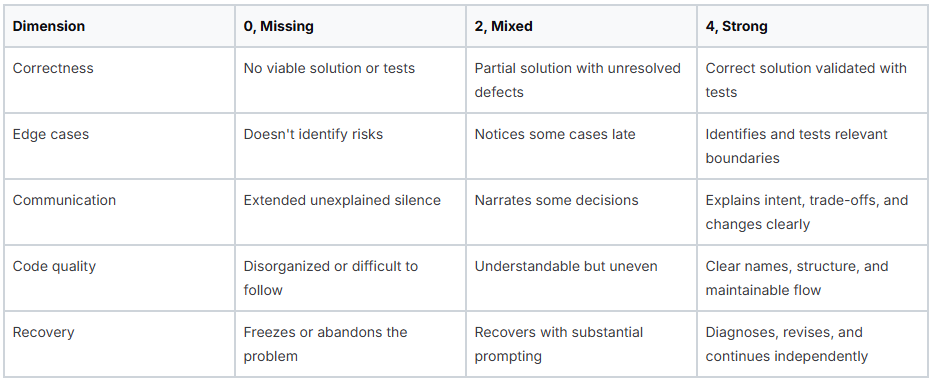
Record the screen and review it before the debrief. Look for delayed narration, premature coding, untested assumptions, and recovery that depends on hints. If you compare platforms or review best AI interview assistant tools, judge whether they reproduce the constraints you need, not how many hints they can generate. The practice target is monitored performance, so anxiety, communication, and cue handling belong in the score.
Make the debrief measurable
Have the observer answer three questions:
- When did my reasoning become easiest to follow?
- Where did my pace or communication create uncertainty?
- What single behavior should I repeat or change next time?
Answer three yourself:
- What did I know but fail to communicate?
- Which moment caused the largest time loss?
- What will I do differently in the first five minutes of the next mock?
Keep the answers in a shared tracker. Compare patterns across sessions, then schedule the next mock around the weakest behavior rather than repeating a comfortable problem.
Communication, Pacing, and Debugging Under Pressure
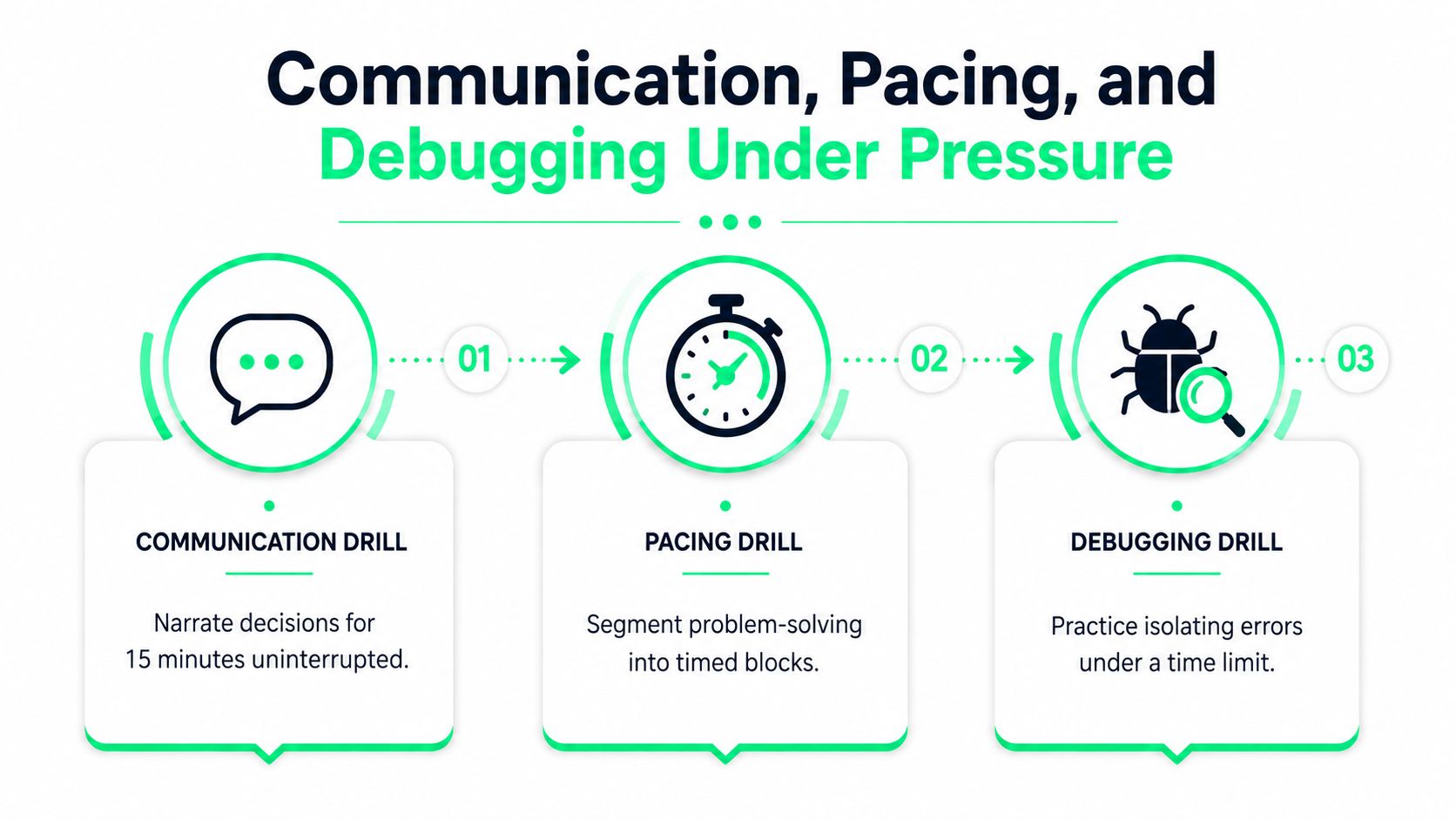
Algorithms get most of the attention, but candidates often lose points through three separate performance failures. They stop narrating, spend too long designing without testing, or discover a bug and react randomly. Treat communication, pacing, and debugging as independent skills with independent scores.
Communication needs deliberate repetition
Take a fresh problem and narrate every decision for 15 minutes. Set a timer to ping every 60 seconds. Each ping asks you to state your current hypothesis, what you've ruled out, or what you'll test next. Log silence gaps, filler words, and explanations that became too detailed to help.
Don't narrate every keystroke. Explain choices that affect correctness, complexity, or maintainability. “I'm using a set to remember values already seen” gives the observer a reason for the data structure. “Now I'm typing the loop” doesn't.
Pacing needs checkpoints
Set a hard midpoint check at 45 minutes in a longer mock. At that point, require yourself to have a declared approach and a passing set of basic tests. If you're not there, say so directly: “The design is taking longer than planned, so I'm narrowing this to a correct baseline and will discuss optimization afterward.”
Before coding, declare the approach and its trade-off. That sentence prevents silent overdesign and gives the interviewer a chance to correct a misunderstanding before it becomes expensive. Whiteboard-style interviews often divide the session into presentation, clarification, design, implementation, and review stages, which is why a timed whiteboard interview structure works better than an undifferentiated countdown.
Debugging should sound like investigation
Start with a working solution, introduce a bug, and race a partner to isolate it under time pressure. Narrate hypotheses instead of making random edits: “The duplicate case passes, so I'm checking whether the pointer moves before or after the comparison.” Then create the smallest failing test and change one assumption at a time.
Score each drill separately. Rotate the emphasis weekly so fluent narration doesn't conceal weak debugging, and fast implementation doesn't conceal poor time control.
Recovery is part of the performance. A calm, testable hypothesis is more valuable than frantic typing.
Using AI Copilots and Practice Tools the Right Way
AI tools are useful when they amplify a practice design you already understand. They become harmful when they remove the struggle that creates fluency. A solo session gives you control and repetition, a peer mock adds social pressure and human judgment, and an AI copilot gives you repeatable feedback when a partner isn't available.
Factor Solo Practice Peer Mock AI Copilot, for example Qcard
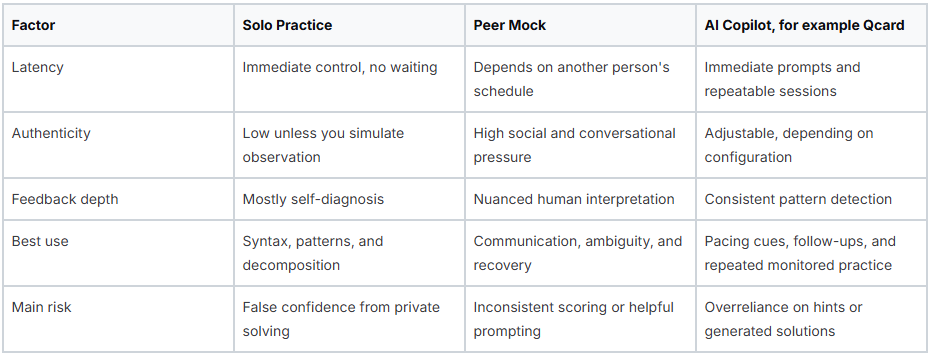
Use solo work when you need raw fluency. Use peer mocks when you need to read another person, respond to interruptions, or explain trade-offs naturally. Use AI when you need unlimited repetitions, low-latency feedback, or an interview-like session outside a peer's schedule.
A practical weekly mix is 40% solo drills, 30% peer mocks, and 30% AI-assisted mocks, with the percentages treated as a planning model rather than a guarantee. Configure the copilot to flag communication and pacing gaps, not suggest algorithms. If the tool hands you the data structure, you've practiced accepting help, not deriving the solution.
Match the tool to the weakest skill
If your code is correct but your explanations are thin, use a timed narration session. If your reasoning is good but you lose the thread while typing, use an AI session that flags long silence and delayed testing. If anxiety spikes when another person watches, prioritize peer observation before increasing problem difficulty.
Voice input can also expose whether you can express a solution without relying on the keyboard. For accessibility or experimentation, review this hands-free coding guide, then keep the interview constraint in mind. A voice tool may help you rehearse verbal fluency, but it shouldn't erase the need to communicate your own reasoning.
Use Qcard's AI interview coach as one possible practice layer for real-time cues and interview preparation. Keep the boundary clear: tools can highlight pacing, filler words, follow-up gaps, or missing talking points, but the candidate must still choose the approach, write the code, test it, and explain the trade-offs.
Your 8-Week Live Coding Practice Plan
The schedule below rises from 6 to 14 hours per week. That range is demanding, so protect one lighter session when fatigue starts producing careless mistakes. Research on coding-interview preparation commonly recommends a 3-month window with about 11 hours per week, along with a depth-first topic sequence. The Tech Interview Handbook study plan supports focusing on one topic at a time before moving on.
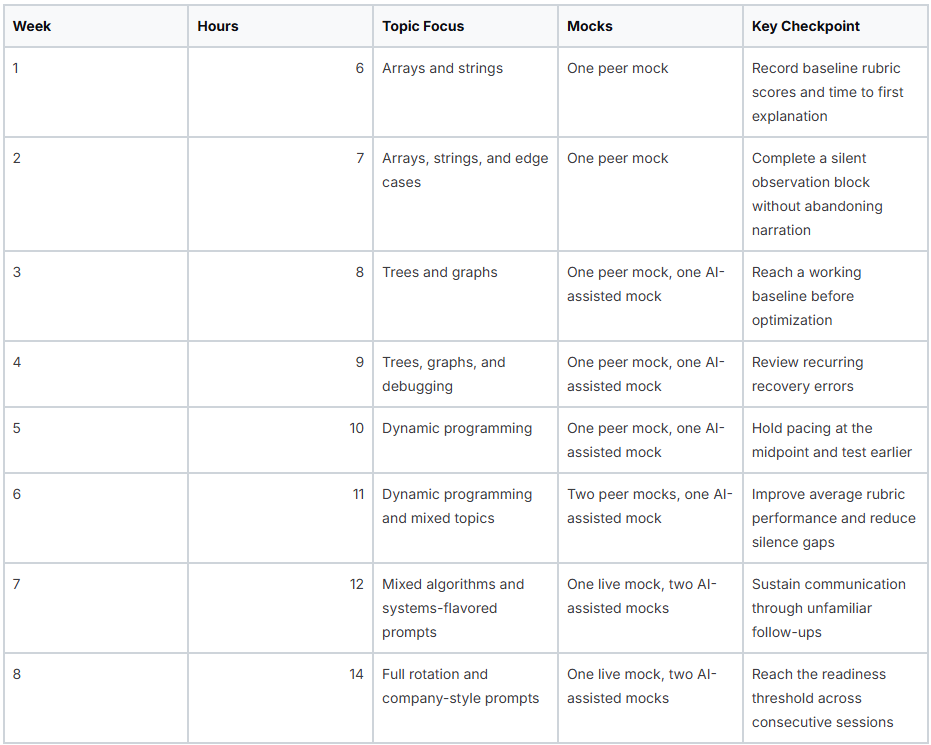
For each week, log hours, topic, problem difficulty, time to first spoken sentence, time to first working test, dead-end attempts, silent-block endurance, and every rubric dimension. A practical readiness threshold is 80% of available rubric points across three consecutive mocks. That threshold is useful only if the mocks use fresh problems and realistic observation.
Adjust without abandoning the plan
Deload when sleep, work, or repeated low-quality sessions make the log worse for reasons unrelated to knowledge. Keep a short review and one easy narrated problem, then resume the previous week's load rather than adding missed hours to the next one.
At week five, stalling usually means the problem set has become too broad or every session is testing the same weakness. Freeze new topics, choose one dynamic programming pattern, and spend a session reviewing recordings instead of solving more prompts. If your rubric scores are rising and recovery is stable, push forward. If scores remain flat across fresh mocks, postpone the interview when the schedule allows and target the lowest dimension. Declare yourself ready only when your performance is repeatable, not when one familiar problem goes perfectly.
Key Takeaways
- Live coding failure is frequently a performance failure, not a knowledge failure — NC State and Microsoft research found observation cut traditional live coding performance by more than half with significantly higher stress and cognitive load, which means solving privately is insufficient preparation when the assessment happens publicly.
- Communication, pacing, and debugging are three independent skills that need independent scores — candidates lose points by going silent, over-designing before testing, or reacting randomly to a bug, and rotating the emphasis weekly prevents fluent narration from concealing weak debugging or fast implementation from hiding poor time control.
- The environment is part of the skill, not a side detail — an 18-to-22 point font, high-contrast theme, external webcam above the monitor, boom microphone, hardwired connection, and disabled Copilot, linters, and Vim extensions during mocks keep your mental capacity on the algorithm instead of the setup.
- Mock interviews only produce signal when they mirror real constraints — a fixed 60-minute window, the expected platform, an observer silent for the first 5 minutes, a problem at or slightly above your level, and a 0-to-4 rubric across correctness, edge cases, communication, code quality, and recovery, because familiar problems measure recall rather than reasoning under observation.
- AI tools help when they amplify a practice design you already understand and hurt when they remove the struggle that creates fluency — configure a copilot to flag communication and pacing gaps rather than suggest algorithms, since if the tool hands you the data structure, you've practiced accepting help rather than deriving the solution.
Qcard provides AI-scored practice, mock interviews with follow-up questions, and real-time coaching for pacing, filler words, and answer length, which can complement the monitored rehearsal required for live coding interviews. Use Qcard to add structured feedback between peer sessions, then review your logs and recordings to turn each practice block into a specific next step.
Ready to ace your next interview?
Qcard's AI interview copilot helps you prepare with personalized practice and real-time support.
Try Qcard Free