How to Prepare for a Phone Job Interview with Confidence
TL;DR
Preparing for a phone job interview is about building a clear mental map, not memorizing perfect answers — the candidates who do well aren't the most polished speakers, they're the ones with tight notes, practiced stories, and a setup that keeps stress out of the way. Start with the job description rather than the company homepage: find the three or four requirements that repeat and map each to a resume example you can deliver without searching for words. Set up a quiet room, test your signal from the exact spot you'll take the call, use a headset over speakerphone, and turn off call waiting. Structure every answer with a one-sentence headline followed by concise STAR proof, and build 5 to 7 adaptable stories instead of scripts. Rehearse out loud in the same physical position with a timer — 30-second intro, 90-second pitch, two-minute story cap. During the call, use keyword prompts rather than sentences, and signal a pause instead of filling silence. Interviewers often form an opinion within 7 minutes and about a third decide within 90 seconds, so pacing and clarity in the opening carry disproportionate weight.
You're probably staring at your phone, waiting for the recruiter's call, and trying not to sound nervous before you've even said hello. That's normal. A phone screen removes the one thing most candidates lean on without realizing it, visual reassurance, so your voice, pacing, and memory cues have to do all the heavy lifting.
The good news is that how to prepare for a phone job interview is more about building a clear mental map than memorizing perfect answers. The candidates who do well usually aren't the most polished speakers, they're the ones who enter the call with tight notes, practiced stories, and a setup that keeps stress out of the way.
How Do You Prepare for a Phone Job Interview?
A phone screen removes the thing most candidates lean on without realizing it — visual reassurance. Your voice, pacing, and memory cues have to do all the heavy lifting. And the window is tight: interviewers often form an opinion within the first 7 minutes, and about 33% make a hiring decision in the first 90 seconds.
Preparation comes down to five things:
1. Research the role before the company page. Read the job description like a recruiter would and find the three or four requirements that repeat. Map each one to a resume example you can say out loud without searching for words. Don't prepare ten stories — prepare three that clearly demonstrate the traits the posting emphasizes. Then build two or three questions that help you judge whether the role is actually a fit: team setup, what success looks like, and the challenges the person in this seat usually faces.
2. Set up the room like a small broadcast booth. Quiet, private space with no interruptions. Resume, job description, and notepad within reach. Notifications silenced and call waiting turned off. Test your signal in the exact room where you'll take the call — a real test call tells you more than a bar icon. Charge the phone fully, keep the charger nearby, and use a headset rather than speakerphone, which introduces echo and makes you sound farther away.
3. Give every answer a headline. Open with a one-sentence summary that tells the listener where you're going: "The clearest example is a project where I improved handoffs across two teams." Then prove it with a concise STAR-style structure. Build 5 to 7 crisp stories you can adapt to common prompts, grounded in your actual resume so follow-ups don't force you to invent details.
4. Rehearse out loud in the exact mode you'll use. Sit where you'll take the call, hold the phone or wear the headset, and answer against a timer. Start with a 30-second self-introduction, then a 90-second opening pitch, then your prepared stories capped at two minutes each. Silent review creates false confidence — you can feel fluent in your head and still stumble in real time.
5. Keep live notes thin and usable. Keyword prompts, not full sentences — full sentences tempt you to read, and reading flattens your voice. A practical card holds an opening line, a transition phrase ("What's most relevant here is…"), a thinking pause ("That's a good question, let me think for a second"), and a closing line.
Research the Role and Company Before the Call
The worst version of phone interview prep is a quick skim of the company homepage, a glance at the job title, and a hope that charisma will fill the gaps. That approach falls apart fast when the interviewer asks you to connect your background to the role in the first few minutes, because phone screens are usually short screening stages rather than full assessments, and the early impression matters a lot. One large interview statistics summary says interviewers often form an opinion within the first 7 minutes, and about 33% make a hiring decision in the first 90 seconds (job interview statistics).
Start with the role, not the company page
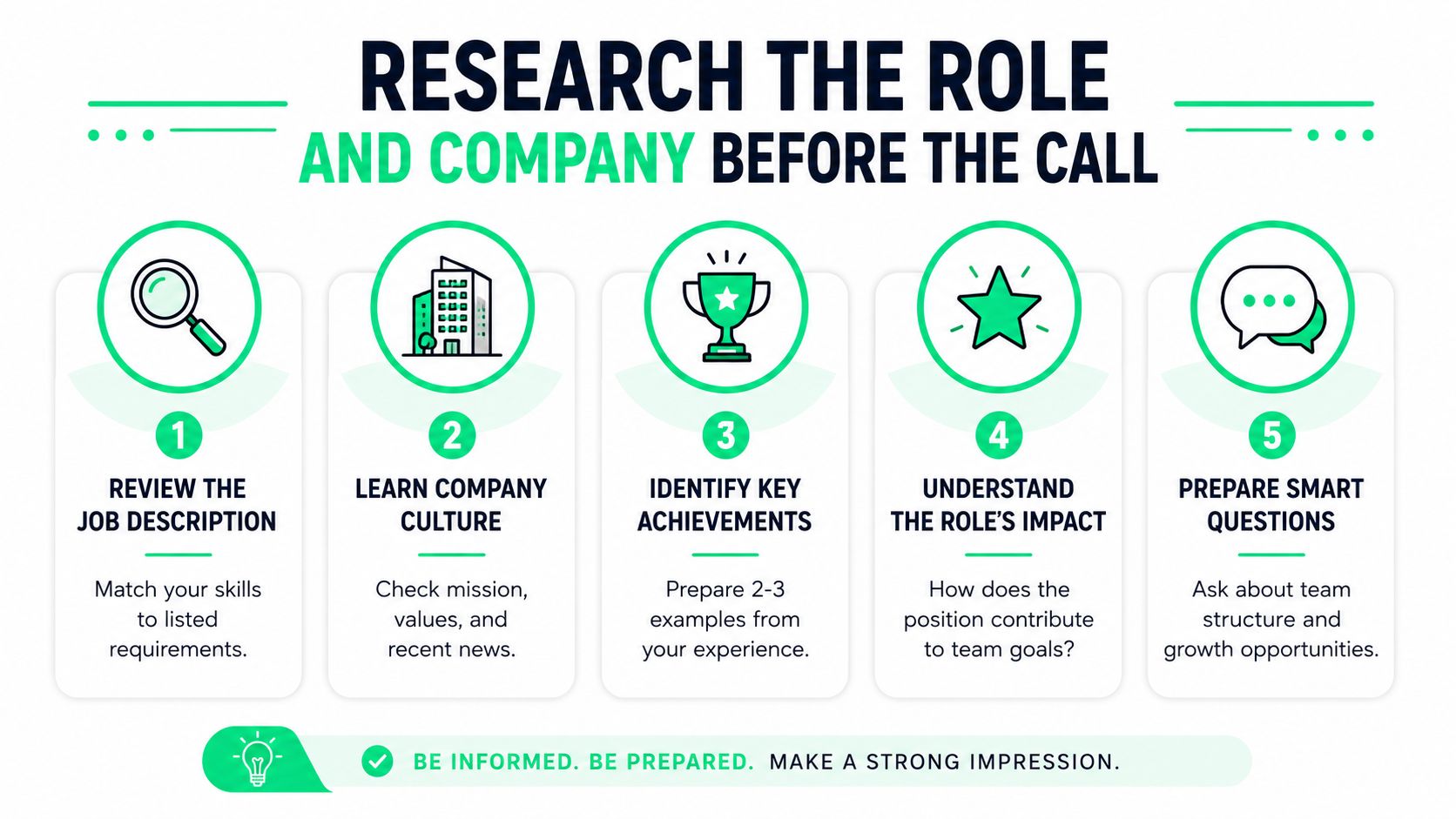
Read the job description like a recruiter would. Look for the three or four requirements that appear again and again, then map each one to a resume example you can say out loud without searching for words. If the role asks for stakeholder communication, problem solving, and cross-functional coordination, don't prepare ten stories. Prepare three that clearly show those traits and make them easy to retrieve under pressure.
A strong opening pitch should do one job, connect your background to the role in a tight narrative. It doesn't need to be dramatic. It needs to answer, quickly and credibly, why you fit this opening now.
Build a small question set that sounds genuinely informed
Research the company's mission, recent news, and the team structure if the interviewer's name is available. Then prepare two or three questions that help you judge whether the role is a fit, not just whether you can survive it. Smart candidates ask about team setup, what success looks like in the role, and the kind of challenges the person in this seat usually faces.
Practical rule: if a question only proves you “did research,” it's not as useful as a question that helps you understand the work.
The strongest questions often come from curiosity about how the work happens. Ask about the people you'd work with, the handoffs that matter, or how the role contributes to team goals. If you want a simple question bank to practice against, this interview question practice resource can help you shape prompts without turning them into scripts.
Set Up Your Environment and Test Your Tech
A phone interview can go off the rails for reasons that have nothing to do with your qualifications. A barking dog, bad reception, or a dead battery creates noise in the literal and mental sense, and once you're distracted, your answers get flatter and more fragmented. The fix is boring but effective, set the room up like a tiny broadcast booth.
Make the room work for you
Choose a quiet, private space with no interruptions. Put your resume, the job description, and a notepad within easy reach, then silence notifications and turn off call waiting so the interview doesn't get hijacked by alerts or another incoming call. One practical setup is to tape the job posting on the wall, place your resume on the desk, and clear the surface so you can glance at notes without shuffling paper.
The 15 to 30 minutes before the call matter too. Use that window to confirm the interviewer's name, contact information, and any other key details so you're not opening the conversation in a rush. A calendar reminder set early gives you time to review the role, your opening answer, and the caller's number before the phone rings.
Test the device, not your luck
Charge the phone fully, verify that it's working properly, and check the signal in the exact room where you'll take the call. If your mobile connection is weak, a landline or backup device is a better option than hoping the call won't drop mid-answer. A real-world test call from the interview room tells you more than a bar icon ever will.
Speakerphone can seem convenient, but it often introduces echo and makes you sound farther away. A headset usually gives you more control, especially if you tend to pace while talking. Keep the charger nearby, because the last thing you want is to watch the battery drain while you're trying to describe your best project.
Quiet setup beats improvisation. If you can't control the room, you'll spend the interview managing distractions instead of making your case.
Structure Answers for a Voice Only Format
Phone interviews strip away body language, eye contact, and the little nods that make a conversation feel smoother. That changes the whole rhythm. If you ramble, the interviewer hears every detour. If you pause too long, silence feels louder than it does in person. Your answers need a shape that works by sound alone.
Give every answer a headline
Start with a one-sentence summary that tells the listener where you're going before you go there. Something like, “The clearest example is a project where I improved handoffs across two teams,” is easier to follow than a slow build that only lands at the end. Once you've named the point, use a concise STAR-style structure to prove it.
The most useful prep here is not memorizing polished paragraphs. It's building 5 to 7 crisp stories you can adapt to common prompts, then practicing them aloud until the shape feels natural. Keep the examples grounded in your actual resume so you can answer follow-up questions without inventing details on the fly.
Use memory cues, not full scripts
Full scripts break the moment the interviewer changes direction. Keyword prompts work better because they nudge your memory without trapping you in exact wording. A simple card with phrases like “team conflict,” “process fix,” or “customer issue” is enough to keep you oriented.
The goal is recall, not recitation.
If you want a digital way to organize those prompts, Qcard is one option that surfaces resume-grounded talking points in real time without turning them into a script. That matters on a phone call, where you can't rely on visual cues to reset your thinking.
A useful pattern is to write one short example for teamwork, one for problem solving, and one for conflict, then rehearse them out loud with a clear beginning, middle, and end. Short answers sound more confident on the phone because the listener can track the logic without effort.
Rehearse Out Loud Under Realistic Conditions
Silent review creates false confidence. You can feel fluent in your head and still stumble the moment you have to speak in real time. Phone interview prep needs to sound like the interview, not like private study.
Practice in the exact mode you'll use
Sit or stand in the spot where you'll take the call, hold the phone or wear the headset, and answer a timer out loud. Start with a 30-second self-introduction, then move into a 90-second opening pitch that ties your background to the role. After that, rehearse the stories you prepared earlier with a hard cap of two minutes each.
That time limit matters because phone interview answers can drift without visual feedback. A friend or an AI mock interviewer can be useful here if they ask a follow-up you didn't expect, because the surprise forces you to think instead of recite. If you want a structured practice loop with follow-up questions and feedback, Qcard's mock interview tool is built for that kind of rehearsal.
Train pacing, not just content
The simplest fix for sounding nervous is slowing down on purpose. Mark a breath after your opening sentence, pause briefly before a key result, and stop talking the instant you've answered the question. Those small pauses make you sound deliberate instead of flooded.
You can also use the timer to watch for filler words. If every practice answer feels slightly too fast, it usually means you're trying to outrun the silence. That's common, and it's fixable. A few repetitions in real phone mode teach your ear what calm pacing sounds like.
Mock practice works best when you treat it like a live simulation. Don't keep the notes neatly in front of you and don't reread polished paragraphs. Glance, speak, adjust, repeat. That's the muscle the interview will ask for.
Use Scripts and Real Time Cues During the Call
Even well-prepared candidates can blank out once the call starts. A surprising question, a noisy background, or a moment of self-consciousness can make your memory feel narrower than it did five minutes earlier. Real-time cues help because they give you a bridge back to your own experience without making you sound rehearsed.
Keep the notes thin and usable
Use keyword prompts, not full sentences. Full sentences tempt you to read, and reading makes your voice flatten out. Keywords keep the structure visible while leaving room for natural phrasing.
A practical card might include:
- Opening line: current role, core strength, years or type of experience if relevant
- Transition phrase: “What's most relevant here is...”
- Thinking pause: “That's a good question, let me think for a second.”
- Closing line: “I'd welcome the chance to continue the conversation.”
Those prompts are enough to steady your memory without sounding memorized. They also reduce the blank-mind feeling that hits when the interviewer changes topics quickly.
Use the call to sound composed, not polished
A short self-introduction should do three things, name who you are, connect to the role, and give the interviewer a reason to keep listening. If you need a moment, say so directly and briefly. Silence is less awkward when you signal what's happening.
Qcard can also serve as a live interview copilot by surfacing concise talking points during the call, which helps candidates stay grounded without scripting every word. The value is not performance theater, it's having a reliable cue when your brain stalls.
The best live-call strategy is consistency. Same setup, same note format, same opening. When the interview starts, your job is to stay readable to the listener, not perfect on the first try.
Manage Phone Anxiety and Cognitive Load
Phone interviews ask more of your working memory than you might expect. There's no nodding face in front of you, no visual pace-setting, and no easy read on whether your answer landed. That creates cognitive load, and for texting-first candidates or neurodivergent candidates, the strain can be even sharper because voice-only conversation takes more processing effort.
Treat voice fluency as a skill, not a personality trait
Recent coverage has noted that some Gen Z candidates are so unused to voice calls that even basic phone practice is being recommended, which fits what many coaches see in prep sessions. The fix is practice, not self-criticism. A few low-stakes practice calls, spoken summaries, and timed answers rebuild fluency better than endless rereading.
For neurodivergent candidates, the friction often comes from missing visual cues and needing more explicit processing time. Structured notes, permission to pause, and questions shared in advance can make the exchange more accessible. If the interviewer doesn't offer that flexibility, you can still ask for a moment to think without apologizing for it.
Calm your system before the call starts
A five-minute vocal warm-up can help more than generic “just breathe” advice. Read a paragraph out loud, loosen your jaw, and say your opening line two or three times at a normal speaking pace. Then ground yourself with one practical sentence, not a motivational speech.
This is a conversation about your work, not a test of your worth.
That reframing helps because phone screens are gatekeeping conversations, not verdicts on your value as a person. If you're prone to phone anxiety, the aim is not to erase it, it's to keep it small enough that your preparation can still show.
If you've got a note system, a quiet room, and a rehearsed opening, you've already reduced most of the hidden load. What's left is to speak clearly, listen closely, and keep returning to the examples you prepared.
If you want a tighter way to rehearse phone screens, organize memory cues, and practice live answer delivery without turning your answers into scripts, try Qcard. It's built for candidates who need real-time talking points, mock interviews, and pacing feedback that fits the realities of a phone job interview.
Key Takeaways
- The opening minutes carry disproportionate weight on a phone screen — interviewers often form an opinion within the first 7 minutes and about 33% make a hiring decision in the first 90 seconds, which is why a tight, rehearsed opening pitch that connects your background to the role matters more than any answer later in the call.
- Reading the job description like a recruiter beats researching the company page — identifying the three or four requirements that appear repeatedly and mapping each to one retrievable resume example means you walk in with three strong, relevant stories instead of ten scattered ones you can't access under pressure.
- Environment setup is preparation, not housekeeping — testing your signal in the exact room, charging the device, silencing notifications, turning off call waiting, and using a headset instead of speakerphone all remove the distractions that make answers flatter and more fragmented, because once you're managing the room you're no longer making your case.
- Voice-only answers need a headline before the proof — starting with "The clearest example is a project where I improved handoffs across two teams" lets the listener track your logic from the first sentence, whereas a slow build that only lands at the end sounds like rambling when there's no body language to smooth the rhythm.
- Keyword cues outperform scripts, especially for texting-first and neurodivergent candidates — full sentences tempt you to read and flatten your voice, while short prompts like "team conflict," "process fix," or "customer issue" trigger genuine recall, and pairing them with a practiced thinking pause ("let me think for a second") makes silence feel deliberate rather than awkward.
Ready to ace your next interview?
Qcard's AI interview copilot helps you prepare with personalized practice and real-time support.
Try Qcard Free